What's this extension about? 📅
A Chrome extension that extracts your MMU CliC timetable,
adds recurring events to Google Calendar, and lets you download it as an
.ics file to import into other calendars like Outlook and Apple Calendar.
Saving you lots of time every trimester.
Requirements 👀
— MMU Student with "Active" current student status ONLY
— Chromium-based browser or Firefox ONLY
Installation 📦
- Go to the extension's page or search "Schedulr" in the Chrome Web Store.
- Click "Add to Chrome".
Usage 🕹️
Note: Some steps after step 4 may vary depending on your target calendar.
For students:
- Go to "View My Classes/Schedule > By Class" in CliC. (Ensure all subjects are expanded).
For lecturers:
- Go to "Instructor WorkCenter > My Weekly Schedule" in CLiC.
- Open the extension using the shortcut key or by clicking the extension icon.
- An authentication window will appear — grant permission for both scopes, then reopen the extension.
To import into Google Calendar
- Select Transfer to Google Calendar, then click Confirm.
- Select all the necessary options.
- Press the Submit button to transfer your timetable.
To import into other calendars (Outlook, Apple Calendar…)
- Select Download an .ics file, then click Confirm.
- Select all the necessary options.
- Press Submit to download the
.icsfile. - Go to your target calendar and import the file.
Tip: An .ics file lets you import events into other calendar apps like Outlook.
Key Binding ⌨️
The shortcut key opens the popup page:
- Linux & Windows — Alt+Shift+S
- macOS — Command+Shift+S
Project Status ⏳
Schedulr version 4.1.0 is available on Chrome Web Store and Firefox Add-ons as of now.
Defected CLiC? ⚠️
CLiC (MMU's student portal) sometimes shows incorrect start dates for classes. Even if the actual class day is a Tuesday, CLiC might show the preceding Monday as the start date.
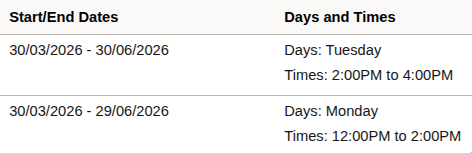
If you notice this discrepancy in your timetable, select "Yes" for "Defected CLiC?" in the extension settings. This ensures that Schedulr correctly calculates the first class date based on the day of the week rather than the potentially incorrect start date provided by CLiC.
Contributing 🤝
Schedulr is an open-source project designed to assist fellow MMU peers. Feel free to explore the contribution guidelines to get started. Your involvement is greatly appreciated!
Tech Stack 🚀
- JavaScript (ES6+)
- Google Calendar API & OAuth 2.0
- HTML, CSS
- Cloudflare Workers (backend)
- Supabase (database)
- Rollup (bundler)
Changelog 📁
Detailed changes for each release are documented in the release notes.
Privacy Policy 📜
Please read the Privacy Policy for this extension before proceeding.
License ⚖️
This project is licensed under the GNU General Public License v3.0 — see the LICENSE.
Buy me a coffee ☕
I seem to have developed a bit of an addiction to espresso shots, so if you're feeling generous, feel free to buy me a coffee!
Credit 🎉
This project was developed at Hackerspace MMU. Also shoutout to all the friends who helped make it happen.
User Reviews 📝
A happy user of schedulr for the foreseeable future. Straight to the point and it just works.
As an MMU student, this is by far the most time-saving extension for scheduling my classes in Google Calendar.
Something that used to take me an hour or two of painstaking setup every trimester is done with just a single login and a couple of clicks. Works for lecturers too! The .ics option is super helpful for Outlook.
Setup was straightforward and simple, will be using this every semester!
As an MMU graduate, I wish I had this.
10/10 feature. Will be using for every semester.
this is really useful, so I can get 100% attendance
Tried it out and it's amazing!! Really works and saved my time a lot!! Thank you!!!
Frequently Asked Questions 🤔
Google Chrome, Chromium-based browsers (Brave, Edge, etc.), and Firefox.
No, Schedulr is completely free to use for all active MMU students and lecturers, and it's open-source.
Ensure you have expanded all subjects in the "By Class" page before opening the extension.
Once you've granted permission, your session will be active (doesn't re-authenticate) for 30 minutes. It's designed this way to prevent session hijacking.
See the Privacy Policy for full details.
No, this extension is specifically designed for MMU students and lecturers using the CliC system.
Firefox is now officially supported! Safari is on the roadmap but not currently a priority.
Check if your issue is mentioned in this documentation first. If not, reach out via email, the issue tracker, or Discord.